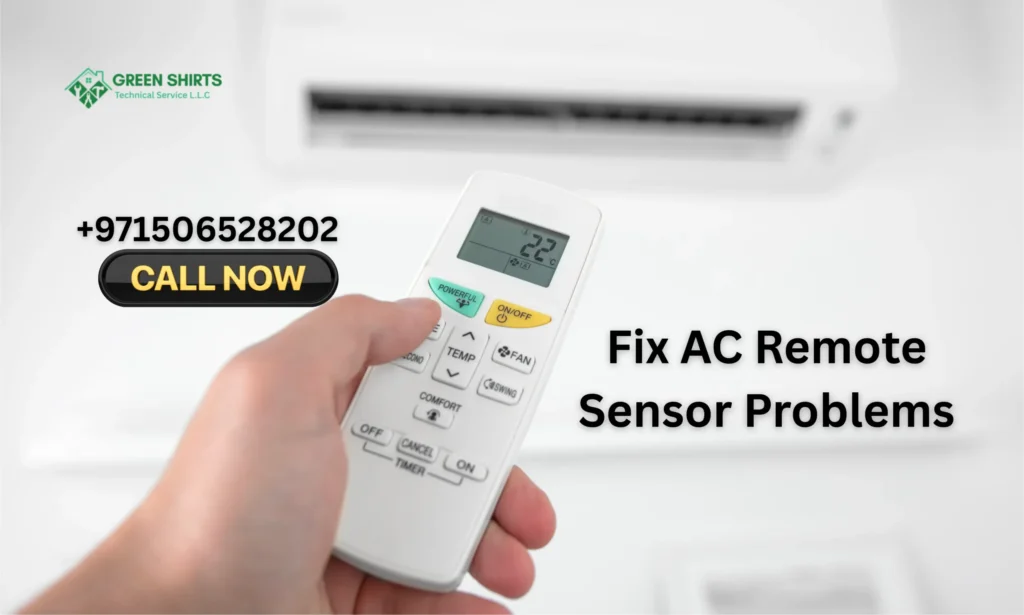
AC remote sensors matter because they help the indoor unit read the signals correctly. The sensor receives commands for temperature, mode, and fan speed. If the sensor does not work well, the AC may not respond on time. It can confuse temperature settings or ignore the remote completely.
Many Dubai homes face sensor problems due to dust, humidity, or blocked signal paths. Sometimes the remote only works from a very close distance. Midway through these issues, Green Shirts provide AC-related services in Dubai and fix sensor faults quickly. Sunlight hitting the indoor unit can also weaken the sensor response.
Table of Contents
Signs Your AC Remote Sensor Is Not Working
- Delayed Response From the AC: You press a button, but the AC reacts after a long pause. This delay shows the sensor is not receiving the signal properly.
- No Response at All: Sometimes the AC does nothing, even when the remote has fresh batteries. This usually means the sensor cannot detect the infrared signal.
- Wrong Temperature Changes: You set the temperature, but the AC changes to a different number. This happens when the sensor reads weak or mixed signals.
- Remote Only Works From Very Close: If the AC responds only when you stand very near the unit, the sensor may be weak or blocked. Dust or sunlight can cause this.
- Intermittent Signal Drops: The AC works for a moment and then stops responding. This shows the sensor is losing connection again and again.
- AC Beeps but Nothing Happens: You hear a beep, but the AC does not change mode or temperature. This is a clear sign of a faulty indoor receiver or weak remote output.
Common Causes of Remote Sensor Problems
Weak or Low Batteries
Low batteries reduce the strength of the infrared beam. The AC picks up only part of the signal or misses it completely. Many users think the remote is damaged, but new batteries often fix the issue.
Blocked Signal Path
Infrared light cannot pass through solid objects. Furniture, curtains, or even a hanging cloth can block the remote beam. A small obstacle is enough to stop the signal from reaching the indoor unit.
Dust or Dirt on the Sensor
Dubai’s air carries fine dust that sticks to sensor lenses. This layer reduces the clarity of the infrared beam. A dirty lens sends a weaker signal and makes the AC respond slowly or inconsistently.
Faulty IR Sensor in the Remote
The infrared bulb inside the remote can wear out over time. When it weakens, the beam becomes unstable. This causes the AC to react only sometimes or only from very close distance.
Indoor Receiver Problems
The indoor unit has a small receiver board that reads signals. Heat, dust, or loose wiring can affect it. When the receiver becomes weak, the AC struggles to read even strong remote commands.
Electrical Interference
Nearby devices create signals that interrupt the infrared beam. LED strips, smart TVs, and Wi-Fi routers often cause interference. This interference leads to delayed or incorrect responses from the AC.
Steps to Fix your Remote Sensor Issues
1. Replace the Batteries First
Always start by putting in new batteries. Weak batteries send a very low infrared signal that the AC cannot read. Even if the display on the remote looks normal, the output may still be weak. Fresh batteries help the sensor respond quickly.
2. Clean the Remote Sensor Lens
Use a soft cloth to wipe the small black lens on the front of the remote. Dubai dust builds up fast and blocks the infrared beam. A thin layer of dust can reduce signal strength. Cleaning the lens improves clarity and reach.
3. Remove Any Obstacles in the Signal Path
Infrared signals need a clear, straight path. Move curtains, plants, frames, or furniture away from the indoor unit. Even a small decorative item can interrupt the beam. Keeping the path open helps the AC receive commands without delay.
4. Reset the AC Unit
Turn off the AC from the main switch for one minute. This clears small errors inside the indoor receiver board. A reset often fixes problems caused by heat, humidity, or repeated use. After the reset, test the remote again for better response.
5. Check Remote Direction and Distance
Point the remote directly at the indoor unit’s receiver window. Stand within a normal distance, about two to three meters. Avoid pointing at walls or angles, as the beam may scatter. Good alignment improves accuracy and reduces missed commands.
6. Test the Remote With a Phone Camera
Open your phone camera and aim the remote at it while pressing any button. A working remote will show a small purple or white flash on the screen. If no flash appears, the remote’s infrared sensor is weak or damaged. This test helps you confirm the issue quickly.
When the Problem Comes from the Indoor Unit
Sometimes the remote is not the issue at all. The real problem comes from the receiver inside the indoor unit. This receiver reads the infrared signal from the remote. When it becomes weak, the AC does not respond even if the remote is working perfectly.
Dust, humidity, and heat can affect the receiver board over time. Dubai apartments often face this because indoor units run for long hours. Heat builds up inside the unit and weakens the sensor response. Dust on the receiver window also blocks the signal and creates delays.
Loose wiring inside the indoor unit is another common cause. When wires shift due to vibration or long use, the sensor loses connection. A weak or damaged circuit on the receiver board can also make the AC beep but ignore commands.
How to Test the Sensor Using a Phone Camera
Open the camera app on your phone and point the remote directly at the lens. Press any button on the remote while keeping it steady. If the sensor is working, you will see a small purple or white flash on the phone screen. This flash shows that the remote is sending an infrared beam.
If there is no flash, even after pressing several buttons, the remote sensor is weak or damaged. Sometimes the flash appears but looks very faint, which means the signal is not strong enough for the AC to read. This simple test helps you understand if the problem is in the remote or inside the indoor unit.
Reliable AC Repair Experts in Dubai
Dubai’s heat keeps AC units running almost all year. That makes strong, trustworthy AC repair experts essential. A reliable technician understands local weather, building wiring, and common AC problems in the city. They arrive with proper tools and follow safe repair steps. This ensures your AC works well and lasts longer.
If you face sensor issues, weak cooling, or strange noises, call a professional. Green Shirts offer AC repair services across Dubai. Their trained team handles remote sensor checks, gas pressure tests, wiring faults, and routine maintenance. They identify hidden issues that DIY efforts often miss.
Conclusion
Fixing AC remote sensor problems becomes easy when you check batteries, clean the lens, and clear the signal path. Simple steps restore most issues. If the indoor unit has a faulty receiver, call a trained technician. With proper care, your AC responds faster and works smoothly.